
This post contains affiliate links. If you purchase through these links, we may earn a commission at no additional cost to you.
For more background on clear affiliate and endorsement disclosures, see the FTC Endorsement Guides.
TL;DR
Use this marketing tool evaluation checklist before buying any software, course, or launch offer. This marketing tool evaluation checklist helps you slow down, check the fit, and skip the purchase if the need is not clear.
- Define the exact problem before looking at features.
- Check whether you already own a tool that solves the same problem.
- Verify claims, hidden costs, refund terms, and whether you will actually use it.
Most marketing tools get bought on impulse. A sales page promises faster results, a launch timer counts down, and the price feels low enough to risk. Two months later the tool sits unused, the subscription keeps billing, and the problem it was supposed to solve is still there.
Marketing Review Lab exists to prevent that. Every review on this site runs through the same five checks before we recommend anything. This article lays out the framework so you have it before you need it.
Table of Contents
How does this marketing tool evaluation checklist work?
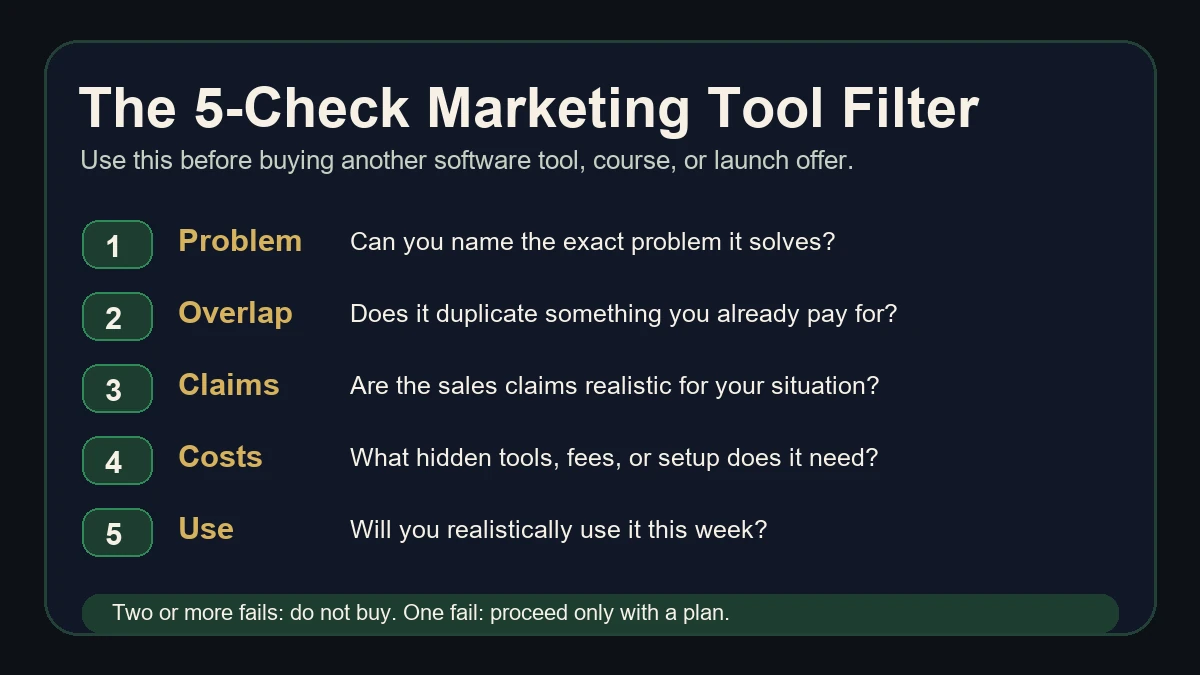
Run this marketing tool evaluation checklist through five questions. If a tool fails two or more of them, the purchase will cost you more than the price tag suggests. Time, attention, and opportunity cost are real expenses.
The five checks:
- What exact problem does this solve?
- Does it replace something I already pay for?
- Are the claims realistic?
- What hidden costs or dependencies exist?
- Will I realistically use it consistently?
Every question targets a specific failure mode. Most wasted purchases fail on question one or question five. The buyer never defined the problem, or they did not have the time to follow through.
Check 1: What exact problem does this solve?
A tool without a clear problem is a subscription looking for a reason to exist.
Before you look at features, name the problem in one sentence. "I need to build a capture page for my affiliate offer" is a problem. "This looks useful" is not.
The sales page will frame the product around outcomes (more traffic, more sales, more leads). Your job is to translate that into the operational gap you have right now. The marketing tool evaluation checklist works because it forces that translation before the sales page does it for you. If you do not have the gap, you do not need the tool.
How to apply this check:
Write down the one task or bottleneck the tool would fix. This marketing tool evaluation checklist starts with the problem because a vague need usually turns into a wasted purchase. If you struggle to name it, that is your answer.
Look at what you did this week. Did the missing tool actually slow you down, or are you buying ahead of a problem you do not have yet?
When we reviewed the Profit Hub System, the first thing we checked was what operational problem it solves for someone starting out with affiliate marketing. The review starts there, not with the feature list.
Check 2: Does it replace something you already pay for?
Tool overlap is one of the most common and least visible costs in online marketing.
If the new tool does what an existing subscription already does, you are paying twice for the same function. Before buying, list what you already use and map the new tool's core features against that list. The overlap is usually larger than the sales page suggests.
Common overlap traps:
- Buying an AI writing tool when your email platform already includes one.
- Adding a landing page builder when your existing website builder has that feature.
- Paying for a standalone link tracker when your affiliate network already tracks clicks.
How to apply this check:
Open your payment history or subscription list. Write down every active tool. For each feature the new product promotes, check whether something you already own does the same thing. If it does, the new tool needs to do it meaningfully better to justify the cost of both.
Check 3: Are the claims realistic?
Sales pages are designed to sell. That is their job. Your job is to separate what the product does from what the marketing promises.
Red flags worth checking:
- Income screenshots with no context about the seller's audience size, ad spend, or time invested.
- "Done for you" claims that still require significant setup, content, or traffic you have to provide yourself.
- Results framed as typical when they are best-case outcomes.
- Guarantees that depend on conditions buried in the terms page.
How to apply this check:
Read the sales page once for information. Read it a second time looking for the word "you." Every sentence that starts with "you will" or "you get" is a claim. Verify each one against the product description, the refund policy, and any public documentation.
If the vendor says the product "works in any niche," check whether they show evidence from more than one niche. If they promise results "in minutes," check whether that includes setup time, learning time, and the work of creating your own content or campaigns.
Our FAQs page covers some of the most common questions buyers ask before purchasing through Marketing Review Lab.
Check 4: What hidden costs or dependencies exist?
The price on the sales page is rarely the full cost.
Many marketing tools require additional spending to function as advertised. A funnel builder needs a domain and hosting. An email tool needs a list, which needs traffic, which often needs ad spend or time. An AI content tool needs a subscription to the AI model it runs on, or charges per use on top of the license.
Dependencies to look for:
- Does the tool need a third-party account or subscription to work (email service, hosting, domain, API key)?
- Are there upsells immediately after purchase? Most WarriorPlus and JVZoo products include multiple one-time offers in the purchase flow.
- Is the stated price a one-time fee, monthly, or annual? What happens to your access if you stop paying?
- Does the tool require technical skills you do not have, and would filling that gap cost time or money?
How to apply this check:
Before buying, find the pricing page and the terms page (not the sales page). Look for words like "requires," "works with," "compatible with," and "additional." This marketing tool evaluation checklist treats each of those words as a dependency signal.
Add up every cost: the product price, the required third-party tools, the time to learn and set up, and any recurring fees. Compare that total to what solving the same problem with your current tools would cost.
Check 5: Will you realistically use it consistently?
This is the check that saves the most money and gets skipped the most often.
A tool only works if you use it. That sounds obvious, but most unused subscriptions were bought with real intentions. The buyer planned to use it, meant to set it up, and moved on to something else within a week.
Honest questions to ask yourself:
- Do you have time in your current weekly schedule to set this up and use it?
- Have you bought similar tools before and not used them?
- Is this solving a problem you are actively working on right now, or a problem you plan to work on "someday"?
- If the tool requires daily or weekly input from you (posting, emailing, creating content), will you actually do that consistently?
How to apply this check:
Look at the last three tools you bought. How many are you still using? If the answer is zero or one, your pattern is buying tools faster than you implement them. The marketing tool evaluation checklist should slow that pattern down before another purchase adds to it.
Block 30 minutes on your calendar for setup. If you skip that block or reschedule it twice, you have your answer about whether this tool will get used.
When should you skip a marketing tool entirely?
Use the marketing tool evaluation checklist as a stop sign. Skip the tool when three or more of these are true:
- You cannot name the specific problem it solves in one sentence.
- You already own something that does the same thing.
- The sales page makes promises that depend on conditions you do not meet (audience size, ad budget, technical skill).
- The total cost, including dependencies, is higher than solving the problem manually.
- You have bought similar tools before and stopped using them within 30 days.
Skipping a purchase is a legitimate outcome of doing your research. Marketing Review Lab does not exist to sell you tools. We exist to help you evaluate them.
How Marketing Review Lab uses this framework
Every product review on this site runs through these five checks. When we review a product, we start with the problem it claims to solve, check whether cheaper or existing alternatives handle the same job, examine the sales claims against the actual product, identify the real total cost, and assess who will realistically use it and who will not.
The Profit Hub System review is a worked example of this approach. We did not start with features or pricing. We started with who the product fits, what it actually requires from the buyer, and where the sales positioning differs from the operational reality.
Future reviews on the site follow the same structure. If you want to see how the framework applies to a specific product, check the reviews archive.
Marketing tool evaluation checklist cheat sheet
Use this before any purchase:
| Check | Question | Fail signal |
|---|---|---|
| 1. Problem | What exact problem does this solve? | You struggle to name it in one sentence |
| 2. Overlap | Does it replace something you already pay for? | Two or more features duplicate existing tools |
| 3. Claims | Are the claims realistic? | Income screenshots, "done for you," or "works in any niche" with no evidence |
| 4. Hidden costs | What dependencies and extra costs exist? | Total cost is 2x or more above the listed price |
| 5. Consistency | Will you realistically use it? | You have stopped using similar tools within 30 days before |
Two or more fails: do not buy. One fail: proceed with caution and a plan to address the weakness.
How do you use this checklist during a product launch?
Product launches pressure you to decide fast. A countdown timer, a rising price, and a stack of bonuses create urgency that works against careful evaluation. That is by design.
Run the five checks before the launch window opens, not during it. Most product launches give you advance notice through an affiliate email, a JV page, or a pre-launch video sequence. Use that lead time.
During the pre-launch period:
- Read the sales page or pre-launch content and answer check one (what problem does this solve for me right now?).
- Open your subscription list and answer check two (do I already own something that does this?).
- Note any income or results claims for check three. Write down the exact words. You will want them later if the product does not deliver.
During the launch window:
- Check the pricing page and the upsell flow for check four. If the front-end price is $17 but three upsells push the real cost past $150, factor that in.
- Answer check five honestly. You are most optimistic about using a new tool on the day you buy it. That is the worst day to judge your long-term commitment.
If you cannot run the marketing tool evaluation checklist before the launch timer expires, wait. Most products reopen, and the ones that do not were rarely worth the rush.
What should you save before you buy?
Keep a record of what the product promised at the time of purchase. Sales pages change after launch. Bonuses disappear. Pricing shifts. If you need to request a refund or dispute a claim later, your own notes are the strongest evidence you have.
Before you click the buy button:
- Screenshot the sales page, especially the "what you get" section, the price, and any guarantee language.
- Screenshot or copy the refund policy. Note the refund window and any conditions.
- Save the confirmation email and receipt with the transaction ID.
- If bonuses were promised, screenshot the bonus offer with the specific items listed.
After purchase:
- Log into the product and confirm you received what was described. Do this within the first 48 hours, not the last day of the refund window.
- If the product requires setup, note how long it actually takes compared to what the sales page implied.
This takes five minutes. It protects you for the life of the purchase.
FAQ
Is this checklist only for marketing tools?
The five checks work for any software purchase, online course, or digital product. The examples here focus on marketing because that is what Marketing Review Lab reviews, but the logic applies to any tool that costs money and requires your time.
What if a product passes all five checks?
A product that passes all five checks is worth buying if the price fits your budget. Passing the checks does not guarantee the product is excellent. It means the purchase decision is rational and the risk of waste is low.
Should I check the refund policy before buying?
Yes. A clear refund policy is a dependency check (question four). Know the refund window, the conditions, and the process before you pay. Terms vary by offer and platform, so confirm the specific product's refund policy before buying. Do not assume every product on the same marketplace has the same terms.
What if I already bought something that fails these checks?
Check whether you are still within the refund window. If you are, request a refund. If you are not, decide whether the tool is worth keeping at its ongoing cost. Cancel subscriptions for tools you are not using. The goal is to stop losses, not to feel bad about past decisions.
Where do I find honest reviews that use this framework?
Marketing Review Lab applies these five checks to every product we review. This marketing tool evaluation checklist is the framework behind our reviews. Browse the reviews archive to see it in action on specific products.
Want to see this checklist applied to a real offer?
Start with the Profit Hub System review. It shows how Marketing Review Lab applies this checklist to a real affiliate-marketing product, including who the offer fits, what buyers should check before joining, and what support or bonus context matters before making a decision.




0 Comments