
Note: Marketing Command Lab is our own free resource. Nothing in this post is an affiliate link.
TL;DR
AI marketing commands are short, reusable labels such as /hookspark or /emaildraft. You paste one into an AI chat, add your offer details, and get a first draft for one specific marketing job. Marketing Command Lab collects 100 of them in 10 categories, with a how-to guide and an example input for each, and it costs nothing.
- Each command names one job: hooks, emails, funnels, offers, or traffic.
- Every command comes with steps, an example input, and a list of places to use the result.
- Any AI chat works. You install nothing and need no API key.
- Access is free. You enter your first name and email address.
- Treat every output as a draft. You still check the facts and claims.
Table of Contents
What are AI marketing commands?
AI marketing commands are short labels, written like /hookspark, which tell an AI assistant which marketing job to do. You add your offer, audience, and goal after the label, and the AI writes a first draft from it.
AI assistants do not ship with these labels built in. The label works because its name describes the job, and the details you add give the AI enough context to act on. Treat each command as a reusable brief you fill in, so you stop rewriting the same instructions every time.
Compare two requests. "Write me an email" gives the AI almost nothing. A command-based request names the job, the audience, the problem, the outcome, and any limits. The second request gives the AI more to work with, and the first draft usually needs less repair.
How do you use a marketing command?
You use a command in five steps, and the whole routine takes a few minutes.
- Pick the job. Search the library or filter by category until you find the task you need done.
- Copy the command or the example input from its card.
- Replace the example details with your own: the product or offer, the audience, the main problem, the outcome you want, and any proof you are allowed to mention.
- Paste it into ChatGPT, Claude, Gemini, or another AI chat.
- Ask for a revision. Request a shorter version, a different angle, or a version for another channel instead of starting over.
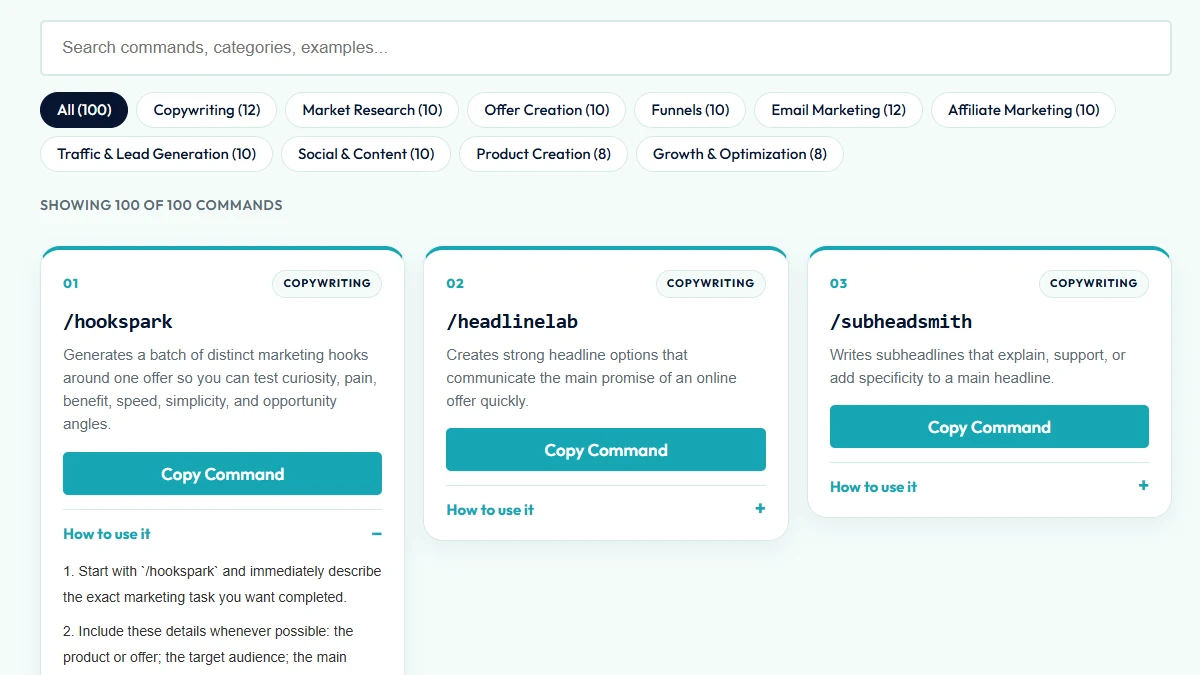
Here is a sample input for /hookspark: "/hookspark AI affiliate toolkit for beginner marketers who struggle to create daily promo content. Outcome: launch campaigns faster. Angle: no complicated setup."
Only give the AI true details. If you have no testimonial, do not ask for one. If you have no earnings proof, do not ask the AI to imply any. The guides in the library repeat this rule on every card.
What is inside Marketing Command Lab?
The library holds 100 commands across 10 categories. Each card shows the command, a one-line description, a copy button, and an expandable guide with steps, an example, and the places the result fits best.
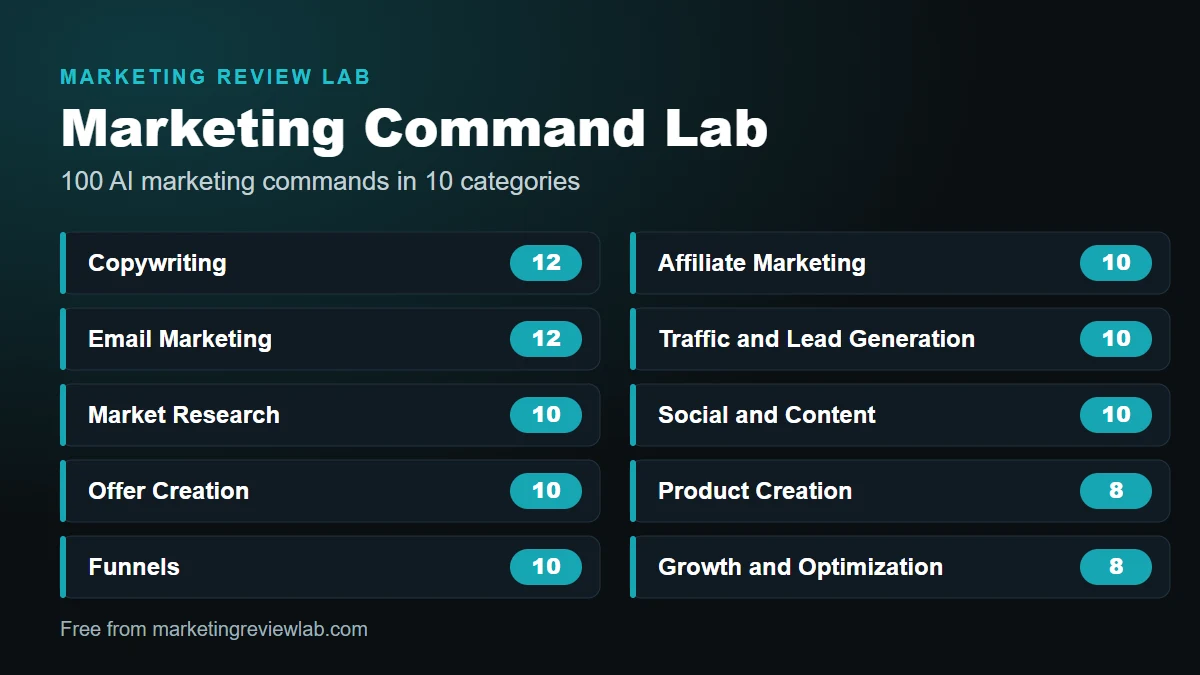
| Category | Commands | Examples | Covers |
|---|---|---|---|
| Copywriting | 12 | /hookspark, /headlinelab, /painpoint | Hooks, headlines, and problem-aware copy |
| Email Marketing | 12 | /emaildraft, /subjectspark, /cartrescue | Emails, subject lines, and follow-ups |
| Market Research | 10 | /painscan, /buyerprofile, /nichehunt | Audience problems, buyer profiles, and niche ideas |
| Offer Creation | 10 | /offercraft, /valuestack, /riskreverse | Offers, value stacks, and guarantee language |
| Funnels | 10 | /funnelmap, /entryoffer, /upsellflow | Funnel maps, entry offers, and upsells |
| Affiliate Marketing | 10 | /promopitch, /reviewdraft, /comparedraft | Partner pitches, reviews, and comparisons |
| Traffic and Lead Generation | 10 | /magnetlab, /adspec, /referralloop | Lead magnets, ad briefs, and referral ideas |
| Social and Content | 10 | /socialdraft, /contentcalendar, /contentrepurpose | Posts, calendars, and repurposing |
| Product Creation | 8 | /productscout, /namespark, /modulemap | Product ideas, names, and module outlines |
| Growth and Optimization | 8 | /conversionaudit, /splittest, /retentionplan | Conversion ideas, split tests, and retention |
Which AI marketing commands should you try first?
Start with the job in front of you instead of working through the list. These four situations cover most first sessions.
You are launching a new offer. Run /offercraft to build the basic offer, /valuestack to organize what the buyer gets, and /funnelmap to plan the path from first click to follow-up.
You write to an email list. Use /subjectspark for subject lines, /emaildraft for a single email, and /broadcastcraft for days when you have no launch to announce. Our guide to affiliate email marketing covers the strategy behind the sends.
You promote other people's products. /promopitch, /reviewdraft, and /comparedraft help you organize a pitch or a balanced review. Read affiliate marketing for beginners first if you are new to the model.
You are not sure who to sell to. Start with /painscan, /buyerprofile, and /nichehunt. Then build a lead capture page around the problem you found, and use /magnetlab and /optincraft for the free offer and the page copy.
For traffic commands such as /adspec and /referralloop, pair them with the options in our overview of traffic sources for affiliate marketing so you pick a channel before you write the copy.
What do AI marketing commands not do?
AI marketing commands speed up first drafts. They do not replace judgment, testing, or honest claims.
- They do not know your offer. You supply the facts, and the draft is only as accurate as the details you give.
- They do not verify claims. AI tools write confident text, including wrong text. Check every number, product detail, and legal claim before you publish.
- They do not replace testing. A hook or a subject line is a hypothesis. Run it, read the results, and keep the version which earns the response.
- They do not guarantee income or sales. No command, prompt, or tool makes sales for you.
- They do not belong near private data. Keep customer lists, passwords, and account details out of any AI chat.
Before you buy any marketing tool, AI or otherwise, run it through our marketing tool evaluation checklist.
How do you get Marketing Command Lab for free?
Enter your first name and email address below. The access page opens right away, and the library costs nothing.
Get Free Access to Marketing Command Lab
100 AI-powered marketing command guides for copy, email, funnels, content, traffic, and offers.
You join the Marketing Review Lab email list when you sign up. Unsubscribe whenever you like. Our privacy policy explains how we handle your information.
Frequently asked questions
Is Marketing Command Lab free?
Yes. You pay nothing. You enter your first name and email address, and the access page opens right away.
Which AI tools work with the commands?
Any AI chat works, including ChatGPT, Claude, and Gemini. The library needs no software, plugin, or API key.
Are the commands real slash commands?
No. The labels are a naming convention. You paste the command and your details into a normal chat message, and the guide on each card lists the details worth including.
Do the commands guarantee better marketing results?
No. They produce first drafts quickly. Results depend on your offer, your audience, and how well you test.
Is this only for affiliate marketers?
No. The library covers copy, email, funnels, offers, traffic, content, products, and growth, so it also suits product owners and service sellers.
What happens to my email address?
You join the Marketing Review Lab email list, and every email gives you a way to unsubscribe. See the privacy policy for details.





0 Comments