

Affiliate disclosure: This page contains affiliate links. If you buy through them, we earn a commission at no extra cost to you. See our affiliate disclosure for details.
TL;DR
A lead capture page is a single-purpose page where a visitor trades an email address for something useful. For affiliate marketers, it sits between your traffic and the offer, so every click has a second chance to turn into a sale through email follow-up.
- Keep one promise, one form, and one button. Remove the menu and every outside link.
- Ask for an email address and, at most, a first name.
- Turn the thank-you page into a bridge page when the offer needs context before the sales page.
- Measure opt-in rate from your own traffic before you buy more clicks.
Contents
- What is a lead capture page?
- Is a squeeze page the same as a lead capture page?
- Lead capture page vs bridge page: which one do affiliates need?
- What should an affiliate lead capture page include?
- What should you leave off the page?
- What happens after someone opts in?
- How do you know if your lead capture page is working?
- Which tools build lead capture pages?
- Frequently asked questions
What is a lead capture page?
A lead capture page is a landing page built to collect one thing: permission to email the visitor. It offers a lead magnet (a checklist, a short training, a swipe file, a bonus) in exchange for an email address.
Affiliates need one because most visitors do not buy on the first click. A vendor's sales page converts a small share of cold traffic, and everyone else leaves for good. A capture page keeps those visitors reachable. You follow up over days and weeks instead of betting everything on one visit.
Sending paid clicks straight to an affiliate link is the first mistake in our affiliate marketing mistakes guide for this reason.
Is a squeeze page the same as a lead capture page?
Yes. Squeeze page, opt-in page, and lead capture page describe the same job. "Squeeze page" is the older internet-marketing term and usually means a short page with almost nothing on it except the headline and the form. "Opt-in page" describes the action. "Lead capture page" is the term most landing page tools use today.
The name matters less than the structure. If the page has one goal (the email address) and nothing competes with it, it does the job.
Lead capture page vs bridge page: which one do affiliates need?
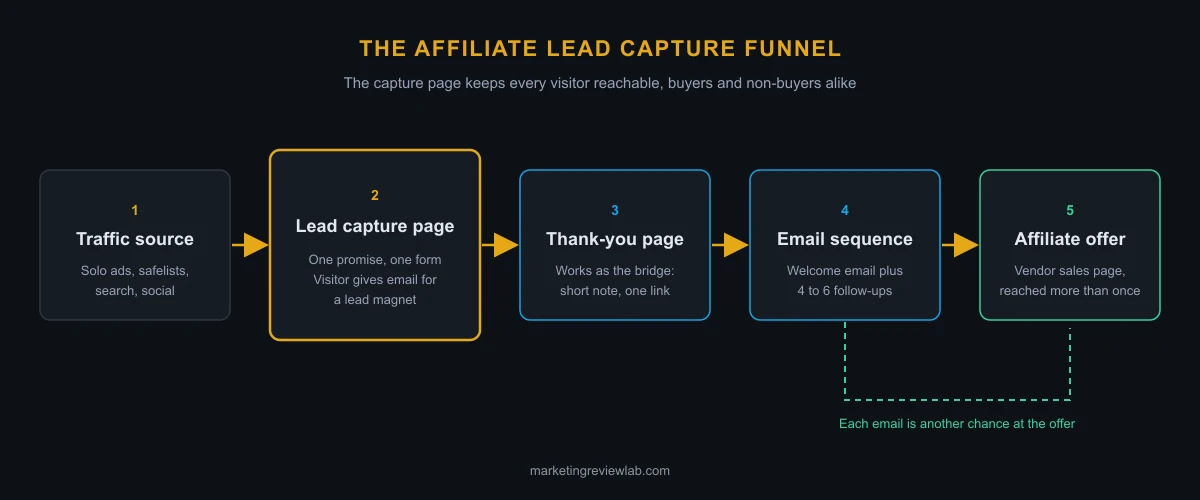
A lead capture page collects an email address. A bridge page warms the visitor up before sending them to the vendor's sales page. They do different jobs, and many affiliate funnels use both.
| Lead capture page | Bridge page | |
|---|---|---|
| Main goal | Get the email address | Pre-sell the offer |
| Visitor action | Fill in the form | Click through to the vendor |
| What you keep | A subscriber to email again | A warmer click, no contact details |
| Best placement | First page after the traffic source | After the opt-in, or before an offer needing context |
The common affiliate setup looks like this: traffic source, capture page, a thank-you page working as a bridge (a short personal note plus a link to the offer), then the email follow-up sequence.
A bridge page alone, with no form, still loses every visitor who does not click through. If you build only one page, build the capture page.
What should an affiliate lead capture page include?
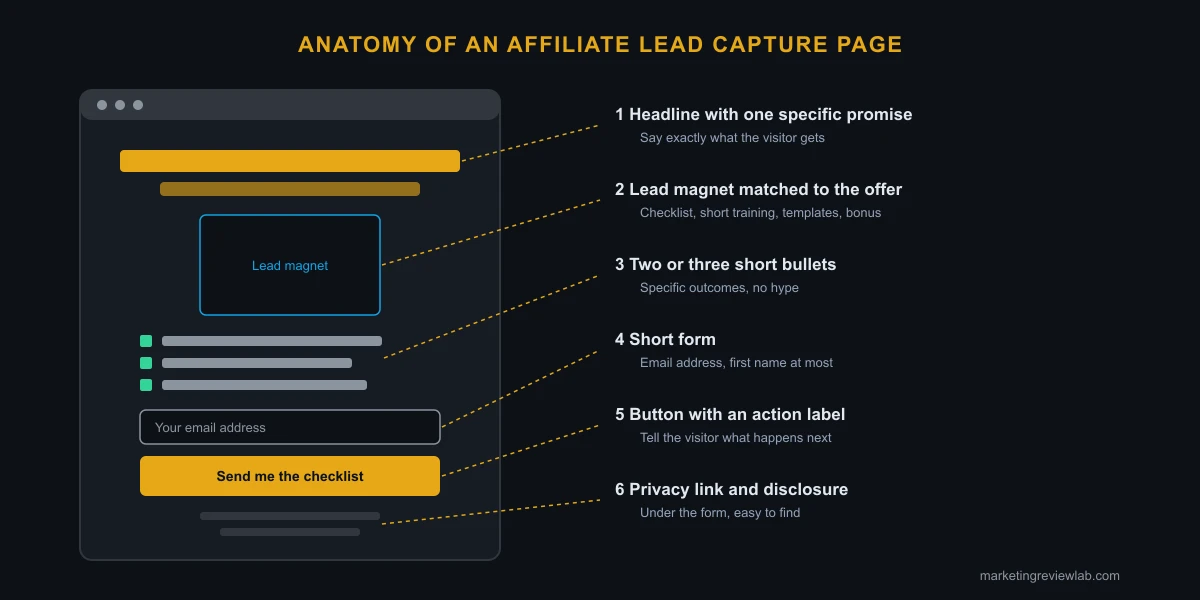
A working lead capture page needs six elements. Anything beyond these has to earn its place.
- A headline with one specific promise. "Get the 7-point checklist I use before promoting any WarriorPlus product" beats "Grow your online business."
- A lead magnet matched to the offer. If you plan to promote an autoresponder, give away an email setup checklist, not a generic ebook about success.
- Two or three short bullets describing what the visitor gets. Specific outcomes, no hype.
- A short form. Email address, plus first name if you use it in your emails. Every extra field costs sign-ups.
- A button with an action label. "Send me the checklist" tells the visitor what happens. "Submit" does not.
- A privacy policy link and your disclosure. Visitors are handing over contact details. Say what you will send and link your privacy policy under the form.
Put all of it above the fold on mobile. Much affiliate traffic, especially from safelists and social posts, arrives on a phone.
What should you leave off the page?
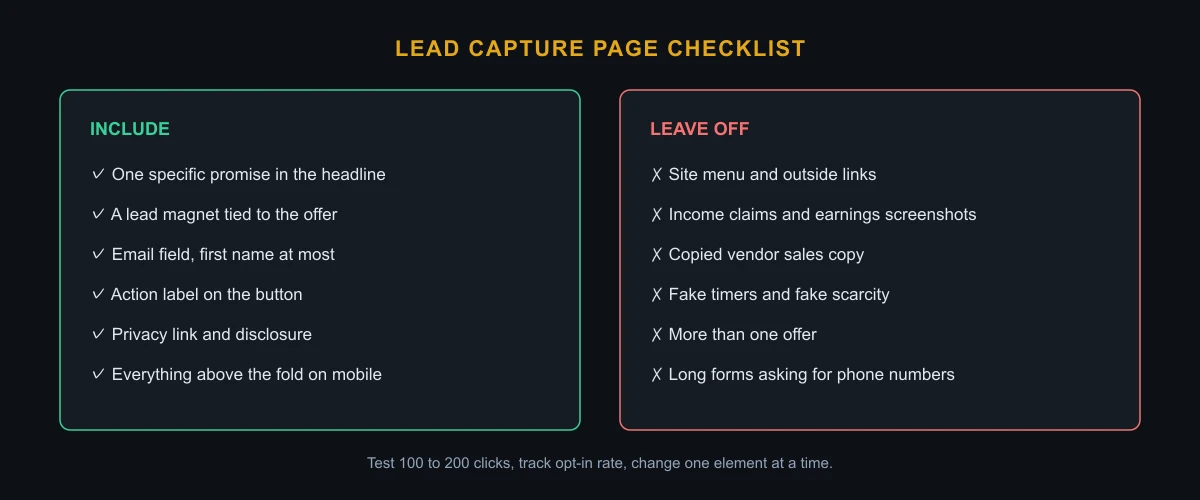
Remove anything giving the visitor a reason to leave without opting in, and anything you would not want to defend later.
- The site menu and outside links. Every link is an exit.
- Income claims and earnings screenshots. They create FTC risk and attract the wrong subscribers.
- Copied vendor sales copy. Write the promise in your own words, about your lead magnet.
- Fake countdown timers and fake scarcity. Readers notice, and trust drops before the first email.
- More than one offer. One page, one lead magnet, one list.
What happens after someone opts in?
The opt-in starts the sale. It does not finish it. Two things need to be ready before the page goes live.
First, the thank-you page. Deliver the lead magnet or tell the subscriber to check their inbox, then use the rest of the page as a bridge: a few sentences on why the offer fits the problem they signed up to solve, and one link.
Second, the follow-up sequence. A welcome email delivers the promised resource. The next four to six emails teach something useful and introduce the offer where it fits. Our affiliate email marketing guide covers what to put in the sequence and how often to send.
How do you know if your lead capture page is working?
Track opt-in rate: sign-ups divided by unique visitors. It is the one number telling you whether the page itself works, separate from the offer.
Run a small test first. Send 100 to 200 clicks from one source, record the opt-in rate, then change one element (usually the headline or the lead magnet) and test again. Changing several things at once hides which change mattered.
Compare results by traffic source, not against numbers you read online. Safelist traffic, solo ad traffic, and search traffic behave differently. Our guides to solo ads and traffic sources explain what to expect from each.
Which tools build lead capture pages?
You need a page builder and an autoresponder, and several platforms bundle both.
- LeadsLeap is free to start and includes page building plus the SendSteed autoresponder, so capture page and follow-up live in one account.
- GetResponse combines email marketing with a landing page builder and suits affiliates planning to grow a larger list.
- Standalone builders such as Leadpages and Unbounce focus on landing pages and connect to a separate email service.
Our best autoresponder for affiliate marketing comparison breaks down the email side in more detail.
If you want to see a capture page, welcome email, and follow-up sequence set up as one system around a real offer, our Profit Hub System review walks through how the product handles it and what to check before buying.
Frequently asked questions
What is a lead capture page in affiliate marketing?
A lead capture page in affiliate marketing is a page where visitors give their email address in exchange for a free resource, before they see an affiliate offer. It lets the affiliate follow up by email instead of losing every visitor who leaves the vendor's sales page without buying.
Do I need a lead capture page to do affiliate marketing?
You do not need one to earn a commission, but without one you lose contact with every visitor who does not buy on the first click. For paid traffic such as solo ads or safelists, a capture page is the difference between buying clicks and building a list.
What is the difference between a squeeze page and a bridge page?
A squeeze page (another name for a lead capture page) collects the visitor's email address. A bridge page pre-sells an offer and sends the visitor on to the vendor's sales page. Many affiliates use the thank-you page after the opt-in as their bridge page.
What should I give away on my lead capture page?
Give away something closely tied to the offer you plan to promote, such as a checklist, a short video training, a set of templates, or a bonus. A lead magnet matched to the offer attracts subscribers who are more likely to buy it.
How many form fields should a lead capture page have?
Use one or two fields: email address, plus first name if you personalize your emails. Each additional field adds friction and lowers the number of people who complete the form.




0 Comments